 PEX
Tamagotchi on Apple Watch: 3 Ways to Add a Virtual Pet
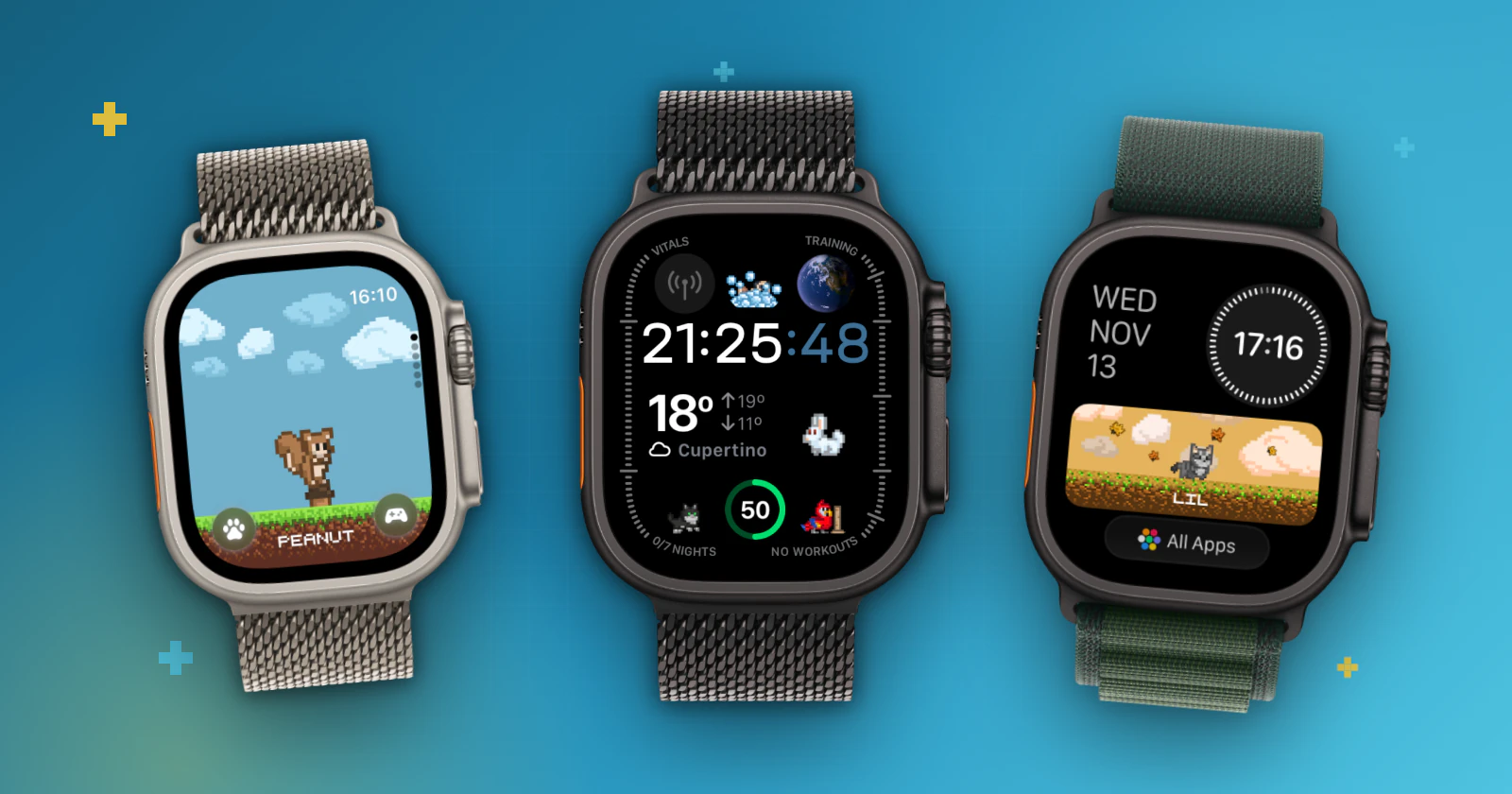
Short answer: yes. Install Pex on your iPhone and Apple Watch, then touch and hold your watch face, tap Edit, swipe to the complications and choose Pex. You can also add Pex to the Smart Stack or open the Pex app on the watch to care for your pet.
Apple Watch doesn't allow third-party watch faces, but apps can live on your watch face as complications. Pex uses complications, Smart Stack widgets and its own watch app to keep a pixel-art pet on your wrist all day.
Three ways to have your Pex on Apple Watch
- Complication: your pet sits on your watch face, next to the time. Pex has circular, corner and rectangular styles, including rectangular versions with the date or the weather.
- Smart Stack: your pet shows up in the stack of widgets you open from the watch face.
- Pex app on the watch: open it to see your pet and take care of its needs.
You can see every style in the Pex app on your iPhone: tap the Widgets button and scroll to the Apple Watch section.
Add Pex as a complication
- Make sure Pex is installed on your iPhone and your Apple Watch.
- On the watch, touch and hold the watch face, then tap Edit.
- Swipe left until you reach the complications.
- Tap the spot where you want your pet and choose Pex.
- Press the Digital Crown to save, then tap the face to use it.
You can do the same from the Watch app on your iPhone: open My Faces, choose a face and pick Pex under Complications.
Add Pex to the Smart Stack
- From the watch face, turn the Digital Crown or swipe up to open the Smart Stack.
- Touch and hold the stack, then tap the add button.
- Choose Pex and the widget you like, then tap Done.
Want a ready-made Pex watch face?
Pex also has its own watch faces that already include your pet. You add them from the Pex app on your iPhone: here is how to add Pex watch faces. More about the app on the wrist: Pex on Apple Watch.
On your iPhone, your pet can live on the Home Screen and the Lock Screen too: see how to add the Pex widget to your Home Screen and to your Lock Screen.
FAQ
Is there a Tamagotchi for Apple Watch?+
Pex is a Tamagotchi-style virtual pet for Apple Watch. You add it as a complication on your watch face or in the Smart Stack, and you can open the Pex app on the watch to care for your pet. It is an independent app, not made by Bandai.
Can I make my own watch face with a pet?+
Apple Watch does not allow custom watch faces from apps, but you can add Pex as a complication to most watch faces, or add one of the ready-made Pex watch faces from the Pex app on your iPhone.
Can my Apple Watch pet look like my real pet?+
Yes. Create your pet in Pex with Pex AI from a photo of your real pet, a drawing, a toy or a keychain, and it shows up on your watch.
Is Pex free?+
Yes. Pex is free to download on the App Store. An optional Premium upgrade unlocks extra features, including some widget styles.
Tamagotchi is a trademark of Bandai. Pex is an independent app and is not affiliated with or endorsed by Bandai.